Start here
Your first session with revoluAItion
Six steps, about 23 minutes of real work, and you are publishing on a schedule with a brand brain behind every draft. Each step shows you the screen you should be looking at. Nothing here needs a call.
What you have at the end
A brand brain
Who you sell to, how you sound, what you will not say. Every draft leans on it.
A week of posts
Drafts written from your own site, slotted at times your audience is actually awake.
Publishing on autopilot
LinkedIn connected, posts going out without you, results read back to you weekly.
Walkthrough video is being recorded. Until then, the steps below cover everything, and the setup call is open.
- 01
Claim your seat and sign in
2 minPay through the link you were sent, then create your account with the same email so the seat lands on the right login.
- Use the email address the invite went to.
- Google sign-in and email both work.
- If the plan badge still says Free an hour after paying, reply to the invite email and it gets switched on manually.
Done when: You are signed in and the plan badge in the sidebar shows your paid tier. - 02
Add your business and let Scout read the site
3 minPaste your website. Scout crawls it and pre-fills what it can work out about you, so you are editing rather than typing from a blank page.
- One business per brand you post for.
- No website yet is fine. You can fill the fields by hand.
- Scout takes about a minute. It is doing the reading you would otherwise do.
Done when: Your business appears in the sidebar with the fields pre-filled from your site. - 03
Fill the Brain properly
10 minThis is the part that decides everything after it. Positioning, ideal customer, voice, goals and brand style. Ten honest minutes here beats a hundred prompts later.
- Ideal customer: job title, company size, the problem they will pay to remove.
- Voice: paste two or three posts you have written that sound like you.
- Goals: what a good month looks like in numbers, not adjectives.
- Guardrails: words, claims and topics that are off limits.
Done when: The Brain health score is out of the red and the voice field has real writing in it. - 04
Run all four agents once
5 minScout, Signal, Strategist and Forge run in sequence. You get a read on your market, the live buying signals, a plan for the week and a set of drafts in your voice.
- Run all four from the business workspace.
- Strategist and Forge now commit to a prediction per recommendation, and the app scores it against real results later.
- Read the drafts. Edit the two you like. Bin the rest without guilt.
app.revoluaition.com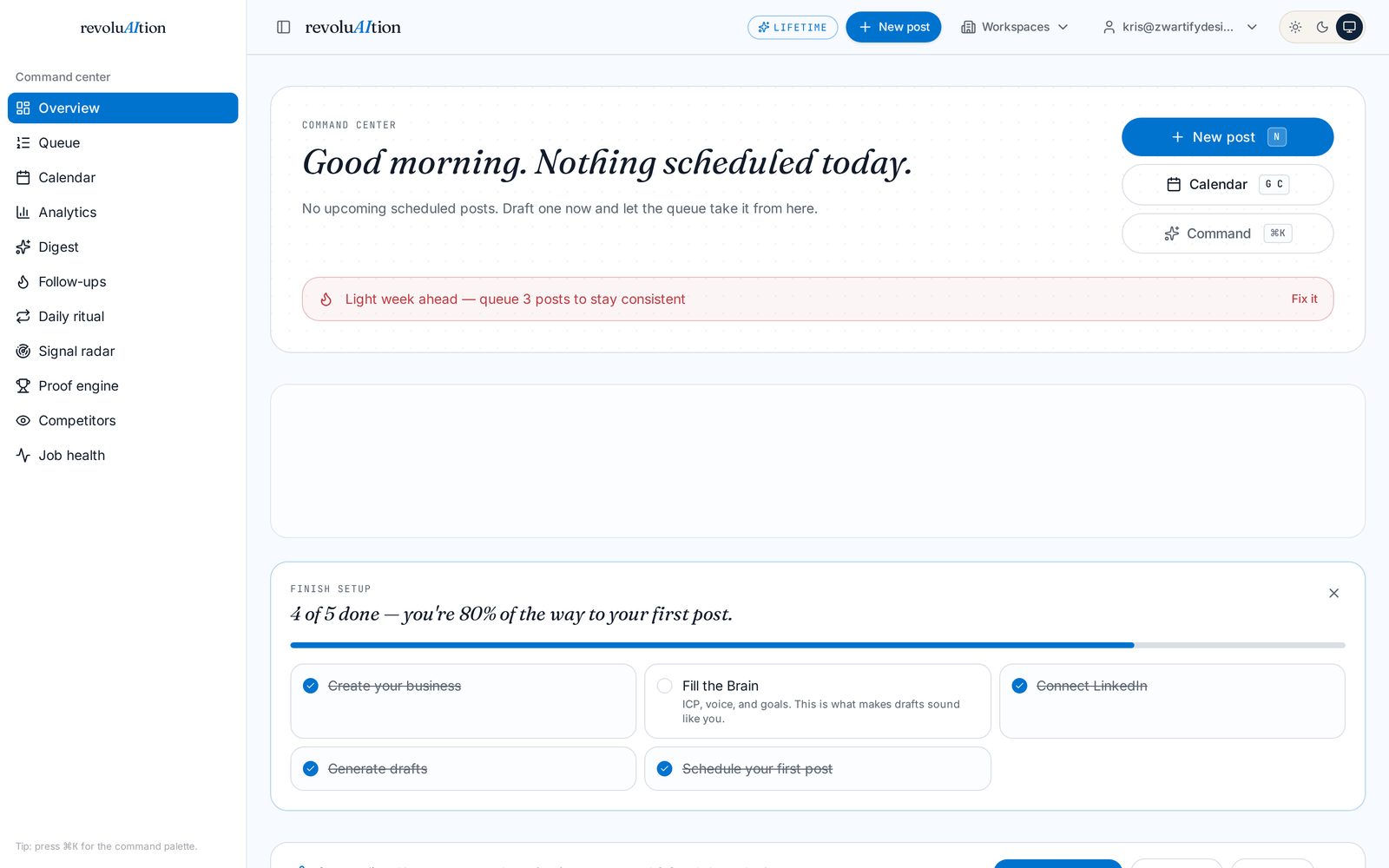 Done when: Four runs show as complete and there are drafts waiting for you to read.
 - 05
Connect LinkedIn and schedule the week
3 minConnect once, turn on auto-publish, then drop drafts onto the calendar or hit Fill my week and let it place them at your best slots.
- The connection is OAuth. No password is stored.
- First comments post automatically, so links stay out of the post body.
- Anything that fails shows up in Job health with the exact reason.
app.revoluaition.com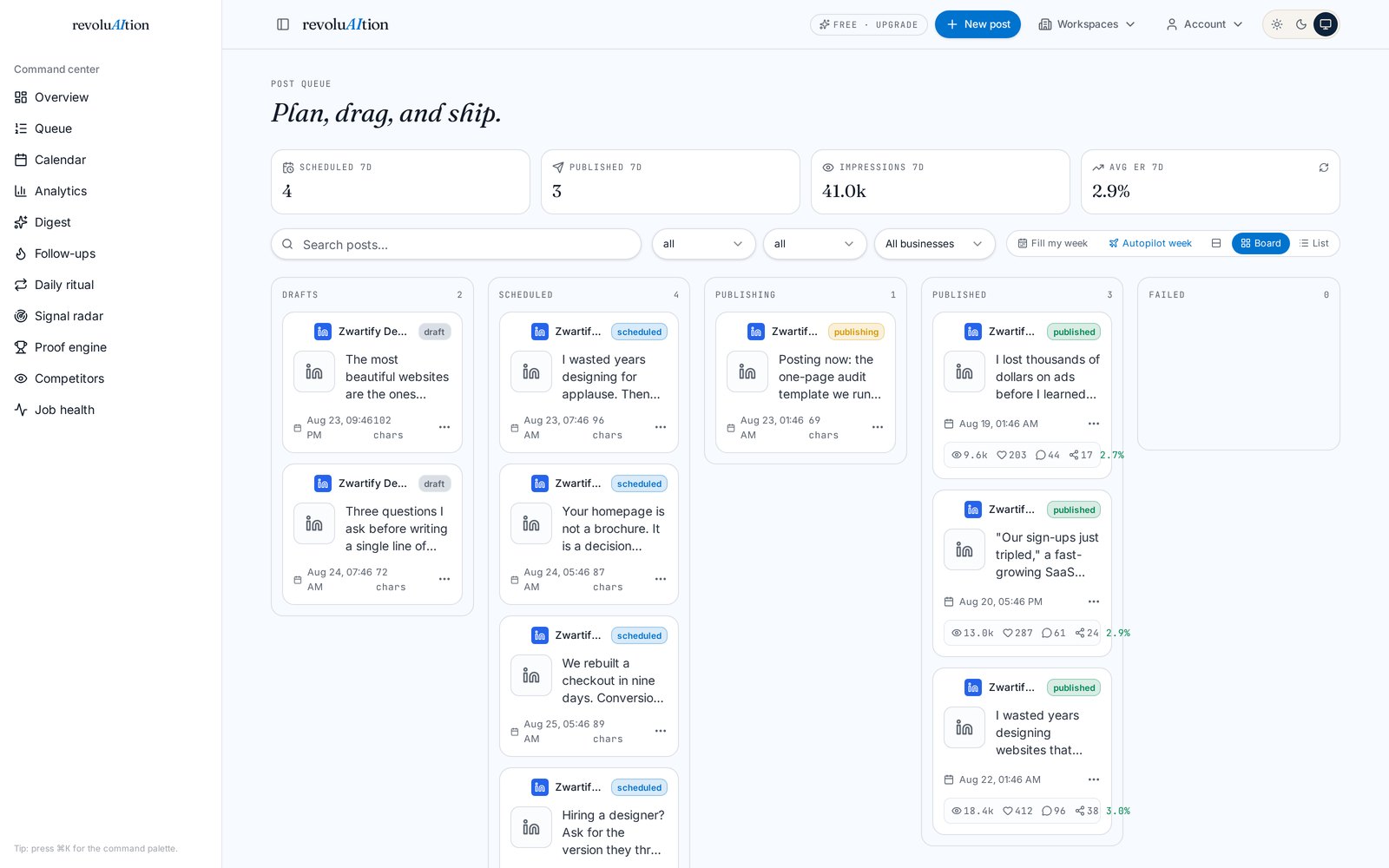 Done when: LinkedIn shows as connected and at least three posts sit in the queue with times against them.
 - 06
Run the daily ritual, then look back after a week
10 min a dayComment, clear, endorse, then publish. After seven days the analytics tell you your best day, your best window and which hooks actually landed, and that feeds the next plan.
- The ritual bar turns green when the engagement work is done.
- Weekly digest arrives by email so you do not have to go looking.
- Proof snapshots turn your numbers into a shareable case study.
Done when: The ritual bar goes green before you publish, two days running.
The questions everyone asks
The drafts sound generic. What did I do wrong?
The Brain is thin. Voice is the field that carries the most weight, so paste two or three things you have actually written, tighten the ideal customer down to a job title and a problem, then rerun Forge. The difference is immediate.
I do not have a website yet.
Fine. Skip Scout and fill the Brain by hand. It takes longer to type, and the output is just as good, because everything downstream reads the Brain rather than the site.
Do I need my own API keys?
No. Paid plans run on managed AI with monthly run limits included. Bringing your own key is optional and only worth it if you want to run past those limits or pin a specific model.
When does analytics actually show anything?
After roughly seven days of live posts. Stats pull back in automatically from the connected channel, and the what-is-working panel needs a handful of posts before its read on your best day and hook patterns means anything.
What if a post fails to go out?
Job health lists every attempt with the exact error. Nearly all failures are an expired channel connection, and reconnecting clears them.
Beyond the first session
The full reference
Organised by job rather than by feature. Once you are signed in, the same guide sits inside the app with a link on every section straight to the screen where the work happens.
Getting started
Ten minutes of setup decides how good every later output is. The Brain is the product.
- 01Add a business and let Scout read your website.
- 02Fill the Brain: positioning, ideal customer, voice, goals and brand style.
- 03Run all four agents once so Signal, Strategist and Forge have something to work with.
- 04Review the drafts Forge produced and approve the ones that sound like you.
The daily ritual
Reach follows behaviour, not just posting. The ritual front-loads the engagement that makes your own post land.
- 01Comment on scored feed posts before you publish anything.
- 02Clear messages and endorsements while you are there.
- 03Publish once the ritual bar is green.
- 04Keep the streak. Momentum rings on the dashboard track it.
Writing and the queue
Draft, check, schedule. The composer scores hooks and flags weak writing before anything ships.
- 01Draft in the composer, or promote a hook from the Idea Bank.
- 02Watch the hook strength meter and the pre-publish check for AI tells and lazy CTAs.
- 03Schedule into the queue, or drag onto the calendar.
- 04Use Fill my week when the queue thins out.
Publishing
Connect a channel once and posts go out on their own, including the first comment.
- 01Connect LinkedIn or X in settings.
- 02Turn on auto-publish for the channel.
- 03Add a first comment for links so the post itself stays clean.
- 04Failures surface in Job health with the exact error.
Measuring what worked
Every published post pulls stats back in, and the analysis is derived from your own history rather than generic advice.
- 01Analytics shows reach, engagement and per-post detail.
- 02The what-is-working panel names your best day, time window and hook patterns.
- 03Proof snapshots turn real numbers into a shareable case study.
- 04The weekly digest and weekly email summarise it without you looking.
Automation
The parts you should never do by hand again.
- 01Autopilot week plans seven days from your drafts and signals.
- 02Recycling reposts your best evergreen content on a schedule.
- 03Competitor watch tracks what rivals ship and how it performs.
- 04Signal radar tiers buyer intent into Hot, Warm and Watch so follow-ups are obvious.
Connect your assistant
Run the workspace from Claude, ChatGPT, Cursor or Lovable through the built-in MCP server.
- 01Copy the server URL from the Connect page.
- 02Add it as a custom connector in your assistant.
- 03Approve the consent screen once.
- 04Ask it to list your workspaces, then draft or schedule from chat.
If you get stuck
- Drafts do not sound like you: the Brain is thin. Paste more of your own writing into the voice field and rerun Forge.
- A post did not go out: open Job health. Every failure carries the exact error, and reconnecting the channel fixes most of them.
- Plan badge is wrong after paying: reply to your invite email and it gets switched on the same day.
- Anything else: email us and a human answers.